





SUMMARY
-
- Identify what is driving the downtime before changing screen media.
- Use modular panels to target localized wear rather than replacing more deck surface than necessary.
- Match panel construction, aperture design, and open-area priorities to the work happening in each deck zone.
- Turn inspection findings and recurring wear patterns into a planned maintenance strategy.
- Confirm that screen operation, material distribution, and support condition are not creating repeat failures.
- Apply the same process,whether in mining or aggregate operations, while matching the priorities to the application.
What Does Screen Uptime Mean?
For a screening operation, uptime is more than whether the vibrating screen is running. It is the ability to keep the screen producing the intended throughput, separation efficiency, and product quality without unplanned interruptions.
A screen can remain in operation while its performance declines. Worn panels, plugged apertures, poor material distribution, damaged supports, or unstable screen motion can reduce usable screening area before a failure forces a shutdown. The result may be lost throughput, carryover, product-specification issues, accelerated wear elsewhere in the circuit, or maintenance that has to be performed on an unplanned schedule.
That distinction matters because modular screen media is most valuable when it supports a broader uptime strategy. The goal is not simply to replace panels faster. It is to identify developing problems early, schedule the appropriate work, and prevent localized conditions from becoming a larger production interruption.
Step 1: Find the Real Source of Downtime Before Changing Media
Before changing screen media, determine whether downtime is caused by the panel itself, the way material reaches the panel, or a broader screen-condition issue.
Start by looking for patterns:
- Is wear concentrated at the feed end, in a narrow material lane, or around a support?
- Are panels failing because of impact, abrasion, plugging, pegging, or damaged fasteners?
- Does material spread across the deck width, or does it travel in a concentrated path?
- Are changeouts driven by one damaged area while most of the deck remains usable?
- Are screen motion, bed depth, feed presentation, or support condition contributing to repeated failures?
These questions matter because a modular panel layout can help manage localized wear, but it cannot correct a feed problem, damaged support structure, or screen motion that is outside the intended operating condition.
For example, if heavy feed is concentrated in one portion of the deck, that area may consume media faster than the rest of the screen. Installing a heavier-duty panel across the entire deck may increase cost without addressing the localized condition. A better approach may be to protect the high-wear zone while retaining a more open design where active screening is needed.
Step 2: Use Modular Replacement to Limit the Scope of Maintenance
One of the clearest uptime advantages of modular screen media is the ability to replace a panel or deck zone rather than a large continuous section of media.
With large tensioned sheets, a localized break, loss of tension, or damaged area can require removal of a much larger piece of screening surface. That can increase labor, extend downtime, and result in replacement of material that has not yet reached the end of its useful life.
Modular systems divide the screening surface into smaller, replaceable panels. When wear is concentrated in a predictable location, maintenance can focus on the panel or zone that needs attention.
That does not mean every modular panel is automatically faster to replace. Panel fastening method, access, lifting requirements, deck condition, and maintenance planning still affect the changeout. But modularity gives the plant more flexibility to target maintenance to the condition of the deck.
At Greenwood Aggregates, wear was concentrated in the first four feet of a wash screen. Polydeck converted that feed section to modular panels so the plant could replace worn media in that area instead of changing a larger side-tensioned section.
Step 3: Match Panel Construction and Aperture Design to Each Deck Zone
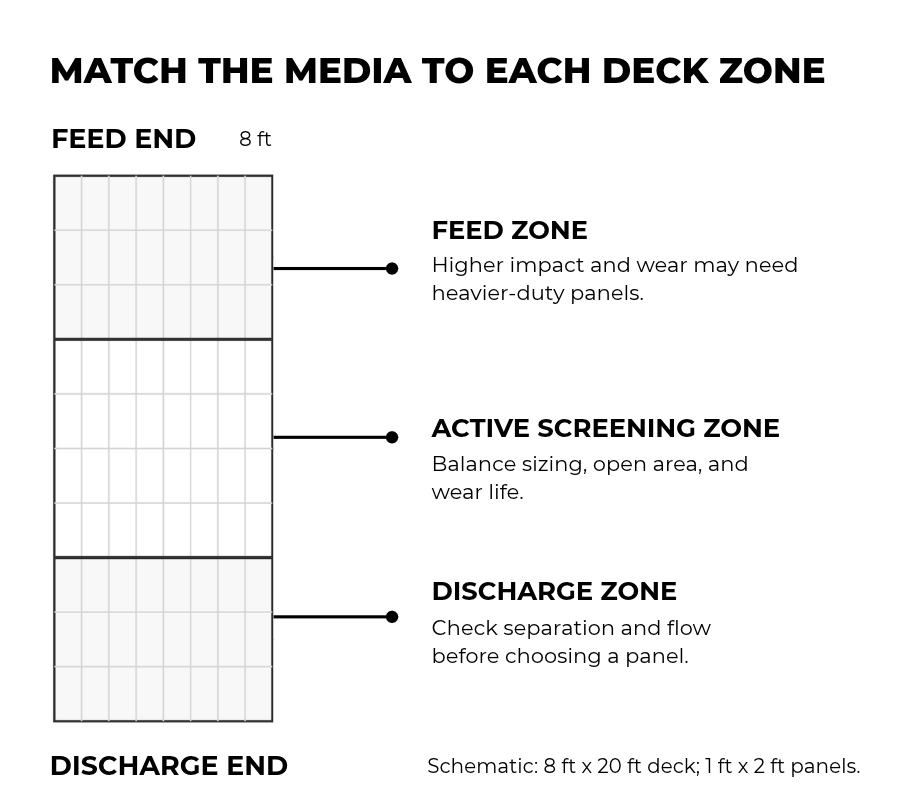
Not every area of a screen deck sees the same duty. Feed zones may experience higher impact and deeper bed depth. Active screening zones may need more usable open area and aperture behavior that supports separation. Discharge zones may require a different balance of wear life, flow, and product control.
A modular layout allows plants to use different panel designs across the deck instead of treating the entire surface as one uniform application.
When planning the layout, consider:
- Feed zone: Does the panel need to absorb high impact or protect the deck structure?
- Active screening zone: Is throughput, usable open area, aperture shape, or resistance to plugging the primary need?
- Discharge zone: Is the goal to complete separation, improve material flow, or maintain the final product specification?
- Localized wear lanes: Is material consistently striking or traveling through one area more heavily than the rest of the deck?
The media material is only part of the decision. Formulation, panel thickness, aperture geometry, bridge design, opening orientation, fastening method, and the support system can all affect panel life and screening performance.
Polydeck’s modular screen media can be configured around what is happening in each part of the screen. After reviewing feed behavior, wear patterns, and maintenance needs, our Screening Experts can recommend different panel designs for different zones. This gives a plant a way to address premature wear or plugging where it occurs while maintaining the throughput and separation it needs elsewhere on the deck.
In mining, this may mean balancing classification performance, recovery, and maintenance intervals. In aggregate operations, the same deck layout decisions may be driven by production targets, crusher protection, saleable gradation, and labor required for changeouts.
Step 4: Build or Align a Preventive Maintenance Schedule
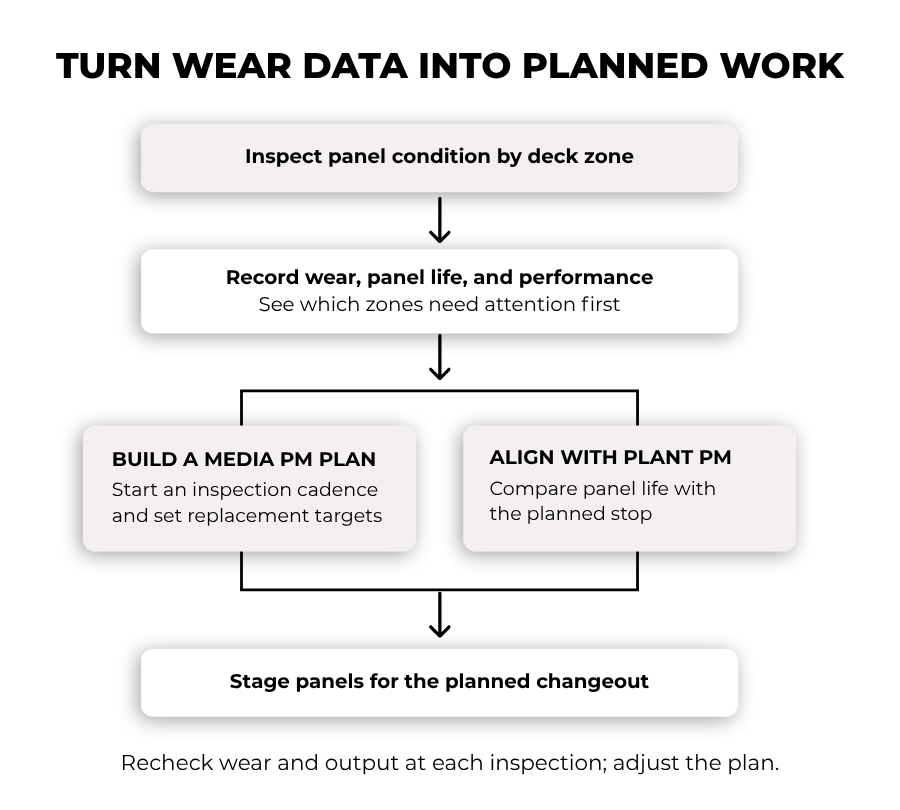
Start by mapping the panels on each deck and recording their installation dates, designs, and locations. At regular inspections, note wear, damaged apertures, loose panels, and changes in screening performance. This creates a record of which zones need attention first and how their condition changes over time.
If the plant does not have a screen media maintenance schedule, use those observations to establish one. Set an initial inspection interval using the application’s demands and the manufacturer’s guidance. As wear patterns become clearer, plan replacement by zone before panels reach a condition that disrupts production. Keep the likely replacement panels available, then adjust the schedule as operating conditions change.
If the plant already has scheduled shutdowns, compare the observed panel life with those windows. A mining site, for example, may want its mill discharge screen to keep performing until the next planned mill shutdown so both can be serviced during the same outage. An aggregate plant may coordinate panel work with crusher or plant maintenance. Panel design and deck layout can be adjusted to help meet that goal, provided inspections show the media is holding up as expected.
At Coeur Wharf Gold Mine, a move from wire cloth to modular synthetic media helped the team forecast panel changes and plan staged changeouts.
When panels in the same deck zone repeatedly need replacement ahead of schedule, investigate feed distribution, loading, support condition, and media design in that area. The pattern may call for a change to the screening setup rather than another scheduled changeout.
Step 5: Verify the Screen Setup After a Media Change
A panel change is not complete when the new media is installed. Before returning the screen to service, confirm that panels are seated and fastened correctly and that the deck supports are in suitable condition. Follow the screen and media manufacturers’ installation and startup procedures.
Once the screen is running, observe how material enters and travels across the deck. Check whether the areas that previously wore early are still taking a disproportionate load, and whether plugging, carryover, or panel movement returns. Screen motion should also be checked against the equipment’s intended operating conditions when recurring problems suggest it may be contributing.
At subsequent inspections, compare panel condition, changeout frequency, throughput, and separation performance with what the plant recorded before the change. Those observations show whether the new layout is helping the screen reach its planned maintenance window or whether another part of the setup needs attention.
When Modular Screen Media May Not Be the Full Answer
Modular media offers the greatest maintenance flexibility when wear varies across the deck and individual panels can be replaced as needed. If most panels reach the end of their useful life at the same time, targeted replacement may offer less of an uptime advantage. The plant should compare actual changeout time, media life, and the work needed to support a modular layout.
A media change also cannot resolve a problem caused by the vibrating screen or its feed system. If abnormal motion, damaged supports, or uneven feed continues to cause early panel failures, those conditions need attention for a new layout to perform as intended.
The decision should be based on the plant’s downtime records and production goals. Modular media may help extend the time between maintenance stops, shorten the work performed during a stop, or both. Knowing which outcome matters most makes it easier to evaluate the proposed change.
How Uptime Goals Differ by Screen Duty
Though the five-step process stays the same, each plant should set an uptime goal based on what its screen does in the circuit and when maintenance can realistically occur.
Mining: A Mill Discharge Screen
The screen may need to maintain the required throughput and separation until the mill’s next planned shutdown. Panels could remain in place but lose performance through wear or plugged openings before that date.
Track panel condition by zone, changes in screening performance, and any unplanned changeouts during the interval. Those records help determine whether the media layout can support the full run and which panels should be ready for the mill outage.
Aggregates: A Final Sizing Screen
The screen may need to keep producing specified product sizes at the required rate until its next planned maintenance window. A damaged opening can affect gradation, while plugged openings can reduce capacity before the screen stops.
Track panel condition by zone, changes in product gradation and throughput, and any unplanned changeouts during the run. Those records help determine which zones need a different panel design and which replacement apertures should be ready for the planned stop.
How Polydeck Helps Put an Uptime Plan to Work
At Polydeck, we start with the plant’s goal: what the screen must produce, how long it needs to perform between planned stops, and where wear or lost capacity begins. Our Screening Experts use that information to recommend a deck layout and panel designs suited to each zone. Depending on the application, that may involve POLYDEX (polyurethane), RUBBERDEX (rubber), or METALDEX (wire) media, along with choices about formulation, panel thickness, apertures, and fastening.
When recurring failures suggest the vibrating screen itself may be contributing, our PRO ANALYSIS: Screen Performance Evaluation can assess screen condition and operation. It reviews factors such as feed distribution, speed, stroke, and movement in the screen and its support structure. Those findings help determine which changes belong in the media layout and which require attention elsewhere in the screening setup.
The result should be a recommendation the plant can test against its uptime goal: fewer unplanned media stops, effective screening through the planned run, and a changeout plan that fits the site’s maintenance schedule.
 English
 Español de Chile
 Português do Brasil